CMOS-Reset - How to reset the CMOS? (Reset BIOS settings)
CMOS-Reset instructions for PC-Mainboards and Notebooks
- Computer don't boot or freezes during boot process.
- BIOS-Error messages like "CMOS Checksum Error".
- Reset lost BIOS-Password (only PC-Mainboards).
- After making a BIOS-Update (recommendation by many PC-Mainboard manufacturers).
- After inserting a new BIOS-Chip.
There are of course other situations, but the above are by far the most common reasons to make a CMOS reset.
What is CMOS?
On which computers can i reset a BIOS-Password?
CMOS-Reset with Jumper
CMOS-Reset without Jumper
CMOS-Reset did not solved the problem! What can i do?
I assume no liability for the accuracy, completeness or topicality of the following instructions. These instructions describe only in general, how to erase the CMOS on PC-Mainboards and Notebooks. It may be completely different for your computer!
First of all: the CMOS is not the BIOS!
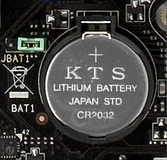
The CMOS (Complementary Metal-Oxide Semiconductor) is a static Random Access Memory (SRAM), which stores the BIOS values. The CMOS will lost its data when removing the voltage/battery (CMOS-Battery, see picture). The duration for a complete loss of data could differs between some seconds, hours, or several days. So it usually won't help to remove the CMOS-Battery for a short time! For this reason, most of all PC-Mainboards have a jumper to immediately reset the CMOS. Notebooks don't have any jumper.
YES, on PC-Mainboards you can clear the BIOS-Boot password resp. BIOS-Setup password by resetting the CMOS.
NO, on Notebooks you can not clear the BIOS-Boot password resp. BIOS-Setup password by resetting the CMOS, because most of all (99%) notebooks have a better theft protection. They have an additional small, hidden IC which stores the password. That means: the password is not stored inside the CMOS! But you can also try to reset the CMOS. Other notebooks are able to store the password on a hidden hard disk sector. Your only chance is to contact the support of your notebook manufacturer. Depending on the manufacturer, you have to send him the serial number of the notebook and you'll get (in many cases free of charge) an individual master password to unlock the notebook. Some other manufacturers even offer only the replacement of the notebook's mainboard - which will be really expensive!
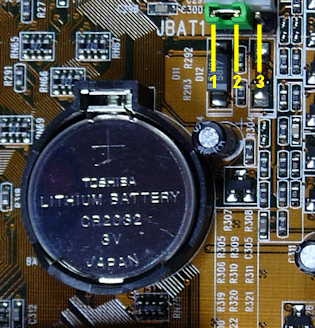
Most mainboard manufacturers have a download section on their websites where you can find the manual of your specific mainboard type. Inside the manual there should be a layout drawing which shows the jumper position.
Read the manual to find out how you can reset the CMOS! Because the procedure can be very different! For instance, most mainboards have to be completely dead, but there are others where you have to reset the CMOS when power is on.
In most cases you can find the jumper (green jumper cap, see picture) nearby the CMOS-Battery. There should be a label like JBAT1, RTCLR, CLRCMOS, CLRCMS, CMOS_CLEAR, Clear RTC, or similar.
There are 4 different CMOS-Jumper types:
3-Pin CMOS-Jumper: The connector strip has 3 pins and the default jumper position is pins 1+2 (see picture). To reset the CMOS move the jumper cap to position pins 2+3.
2-Pin CMOS-Jumper: Depending on the default position, you have to remove or place the jumper.
Soldered points: Sometimes there is no connector strip and you'll only find 2 soldered points which must be bridged (e.g. with a paper clip) to reset the CMOS.
CMOS-Reset-Button: On newer mainboards you'll find different buttons for e.g. Power, Reset and CMOS-Reset. The CMOS-Reset-Button works like a normal CMOS-Reset-Jumper.
- Turn OFF the computer and unplug the power cord (on notebooks remove all accus).
- Press the Power On/Off button (PC-Case) 3-5 times to discharge the mainboard condensers.
- Remove the coin cell battery (CMOS battery).
- Move the CMOS-Jumper to his clear-position (read your mainboard manual to find the jumper).
- Wait ~ 15 seconds (the longer the better).
- Move the CMOS-Jumper to his default position.
- Insert the coin cell battery (CMOS battery).
- Plug the power cord (on notebooks insert all accus).
- Turn ON the computer, enter the BIOS-Setup and load the "Setup Defaults/Optimized Settings".
- Save the BIOS settings and restart the computer.
- No success? Repeat the steps 1-10.
Never turn on the mainboard during a CMOS-Reset!
It could cause a short circuit which would damage your mainboard!
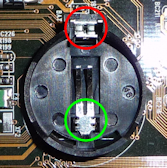
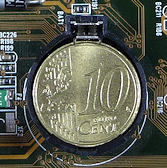
If your mainboard has no jumper (like most of all notebooks) to reset the CMOS, you can try to remove the CMOS-Battery for a few days and hope that this will clear the CMOS. If you don't like to wait, you can try the following instructions, but as I said at your own risk.
- Turn OFF the computer and unplug the power cord (on notebooks remove all accus).
- Press the Power On/Off button (PC-Case) 3-5 times to discharge the mainboard condensers.
- Remove the coin cell battery (CMOS battery).
- Insert a 10 Euro Cent coin into the CMOS battery socket (or bridge the +/- contacts with a paper clip).
- Wait ~ 15 seconds (the longer the better).
- Remove the 10 Euro Cent coin (or the paper clip).
- Insert the coin cell battery (CMOS battery).
- Plug the power cord (on notebooks insert all accus).
- Turn ON the computer, enter the BIOS-Setup and load the "Setup Defaults/Optimized Settings".
- Save the BIOS settings and restart the computer.
- No success? Repeat the steps 1-10.
Never turn on the mainboard during a CMOS-Reset!
It could cause a short circuit which would damage your mainboard!
First you should try the following:
- Repeat the CMOS-Reset and increase the time to clear the CMOS from 15 seconds to a few minutes!
- Check the voltage of your CMOS-Battery (~3V).
- Remove all unnecessary additional hardware like e.g. TV-, Sound-, and Controller cards on your PC-Mainboard (not on Notebooks!). You only need CPU, RAM and Graphic adapter!
- If you have more than 1 RAM module, remove the other (maybe one module is defective?).
- Reset the Hardware table (DMI):
the DMI (Desktop Management Interface) manages the integration of various hardware in a computer. Sometimes the DMI data table gets corrupted and you could try to reset it.
Remove the following hardware components:
- RAM
- Graphic adapter (on Desktop-PCs!)
- all drives like Harddisk, CD, DVD, Floppy, (on Notebooks remove only the Harddisk!)
- TV-, Sound-, and Controller cards, etc. (on Desktop-PCs!)
Power off the computer, insert all hardware components and restart the computer.
Note: if a working BIOS recognizes that some components are missed, the BIOS automatically scans for new hardware and refreshes the DMI hardware table.
Nothing works?
- Check all cable connections.
- Check all components and remove any existing dirt.
- Replace CPU, Graphic adapter and the Power Supply Unit. Or use a second PC to check these components.
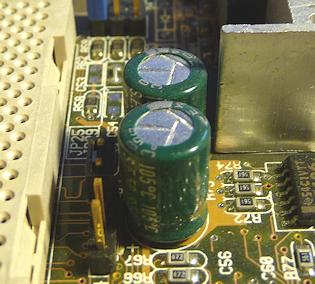 Check all Electrolytic Condensers.
An electrolytic condenser is a cylindrical electronic component that stores electricity.
The cylinder is mostly green, blue or black, and has a pressed aluminum cover.
On older mainboards, it often happened, that the condensers get faulty. In most cases you can identify a defective condenser, when fluid leaked out of the cover, or when the cylinder itself is arched.
In other customers shopping cart
Einträge: 47
Osman Adam 29.May.2023 13:15Please I have Asus x451ca and I want to reset the bios password please can you help me with that
biosflash 14.Sep.2022 18:11@francois
Please read: https://www.biosflash.com/e/bios-cmos-reset.htm#Password (the admin password is also stored in the same way as the bios password)
francois 14.Sep.2022 14:55WOULD THIS REMOVE A BIOS ADMIN PASSWORD TOO
franca 12.Nov.2021 13:18pc ASUS all'avvio schermata nera e 3 beep, cosa fare? Grazie a chi mi risponde.
Homayoun Nobarani 17.Mar.2020 14:50Thank you very much for creating this wonderful page with real information. Thank you!
MelanieWeber 12.Jan.2020 12:14Hi Great resource, thank you. I have bought lenovo x201 with bios settings supervisor password protected. Not too good with electronics, so will probably not go beyond the battery and 10 cent trick. Quick question I haven't found addressed. If I just accept the inability to use Bluetooth or change the booting order, what will happen when the CMOS battery eventually dies and I replace it? Would you expect any problems making the laptop unable to start? The bios clock is now set to 2010, but this is not causing any problems to windows 7. Thank you
some dude 28.Oct.2019 15:22Thank you for creating this wonderful page with all this information. Thank you!
George 17.Apr.2019 15:29Similar boot prob, but with no video. Did procedure above: now power on button press does nothing. ??? What now?
TomW 5.Nov.2018 21:45Hello: Still not working. I left the M/B completely unplugged, no power, no battery, no hard drives, no cards, and the CLR_CMOS pins shorted for a day. Pressed the main PC on/off button several times, etc. Only using M/B, power supply, 1 RAM card in first slot, 1 CPU, built-in graphics, PS2 keyboard, no mouse, no usb, no controller cards, no sound cards, no usb3, as plain as it can be. When I switch on the PC, it tries to boot, then turns itself off for a few seconds, then turns itself on again and boots to the screen asking me for a password. This PC was working fine, I went into the setup a few days ago to check the user and admin passwords, but noticed the one was what it should be, but the other, which should have been the same word, just would not accept, giving wrong password error for the old password to be typed in etc. I thought that was strange as both PW's should be the same word etc. I guess the CMOS chip must be faulty, which is why it won't reset ??. Thanks TomW.
biosflash 4.Nov.2018 22:18@TomW
Try this
Please note: while testing, you should remove all unnecessary additional hardware components from your PC (not on Laptops)! You only need: 1 CPU, 1 RAM 1 Graphic adapter, Power supply unit + mainboard. No CD- and HDD drives! No USB-Sticks! No TV-, Sound-, and other Controller cards, etc.! Connect USB Mouse and USB Keyboard only on USB2.0 ports! Don't use USB3.0!
If all this do not work, then the motherboard or bios chip itself could be defective or some other connected hardware components prevents the PC to boot up.
TomW 4.Nov.2018 20:37Hello: I have a FOXCONN H61MXE motherboard. Everything has been working fine. Recently, I tried to clear the CMOS passwords since the 'User' password would not change whilst in the setup, must be an old PW I have forgotten what it is. Following the simple manual instructions to short out the 2 CLR_CMOS pins on the M/B, even removing the battery, and left short out overnight, the CMOS just will not clear. I have also removed all hard drives etc. I have also shorted out the M/B battery pins whilst the CMOS pins are shorted, and also pressed the PC's main on/off button on and off at this time too. Nothing works. What do I do ?. Thanks....
Richard Gross 25.Jul.2018 18:31I have a DELL XPS one 2710 AIO. While flashing / upgrading the BIOS the electric power went out. Now the PC has power and attempts to start. After approx. 4 seconds (no display on screen) it tries to restart and continues this loop. On the initial try the power button light displays normally. Of the three diagnostic lights on the front of the PC.....the 2nd light illuminates on the first power-up, but not after subsequent power=ups. CMOS resets have not been successful. Any advise would be greatly appreciated. Thanks in advance!!!
Tobie 30.Jul.2017 12:03Thanks it works!!
biosflash 26.May.2017 05:58@Johnnie
You can edit time + date inside the bios setup.
Johnnie 26.May.2017 01:33I try to format laptop (hp Compaq NW8240) and it was showing me 163- date and time not set, so i remove the CMOS battery and replace without another one but it was still showing me the Same thing, please what can i do to solve that?
Ted 28.Oct.2016 14:59Thanks man, the 10 cent trick worked for me and could reset the BIOS and restart my laptop :)
vishnu 2.Oct.2016 19:03thanks for the clear instructions. it worked for me
biosflash 8.May.2016 10:43@Zidan
That's hard to say. Maybe your southbridge (https://de.wikipedia.org/wiki/Datei:Motherboard_diagram.svg) is defective, because it contains also the CMOS MEMORY to store date & time. You should better ask the Acer support.
Zidan 8.May.2016 09:16Hello. After browsing the web I have decided that this site is the most knowledgeable in these matters. I have an unusual problem with an Acer Asprire 4572 that I bought second hand a year ago. I have been working with laptops for the past 20 years so I am fairly conversant with their inner parts. I noticed that this machine loses its time and date each time the main battery is removed or goes completely flat. Naturally I thought that the CMOS battery was dead so today I replaced it. However when I removed the old battery I discovered that it was still giving 3V. I made sure that the terminals and contact surfaces were thoroughly cleaned before I fitted the new battery. However upon rebooting and resetting the Bios (I am running the machine in IDE mode not SATA mode) I discovered that after removing the main battery as a test the clock an the BIOS settings reverted to their defaults again. It therefore appears that the CMOS is not drawing any power from the on-board battery, instead it is using the main battery. Any suggestions as to what is happening here?
ishan 19.Nov.2015 07:01i had a problem last night when i was upgrading my msi990fxa-gd65 board using gui upgrade process after that my system hanged and i restart using button on my rig then it's generate a cycle reboot process everyime and i didn't get anything on display and tried everything what u post and it's not worked for me plz help me sir...
Most wanted
BIOS Beeps BIOS Boot CD BIOS Boot Diskette BIOS Boot Logo BIOS Boot USB Stick BIOS Chip installation removal Programming BIOS Chip Type list CMOS Reset BIOS Help BIOS ID BIOS Passwords BIOS Software Tools 3. Start the BIOS Update 4. BIOS Update failed? BIOS Update Howto 2. Choose BIOS Update method 1. Preparation BIOS Updates, Drivers, Manuals, etc. Online Shop
Favorite items